串口控制LCD1602显示
0赞花了一个下午加一个晚上的时间,写了一个串口控制LCD1602显示程序。用的是virtex5的板子,高端霸气上档次的板子。
功能其实也很简单,就是串口发送什么数据,就将数据显示在LCD1602上面,同时串口把接收的数据给回发回来。
结构图:

说明:
1、 串口部分: 接收和发送串口数据。串口接收到的数据,发送给FIFO。当外部的串口发送使能,就将从FIFO读取的数据发送出去。
2、 FIFO: 作为接收串口数据的暂存数据存储器。因为LCD1602操作是比较慢的,所以不能直接将串口接收到的数据发送给LCD1602进行显示,否则,就会存在数据丢失,所以使用FIFO,先将串口接收到的数据暂存下来,然后在发送给LCD1602.
3、 FIFO控制器: 因为LCD1602处理数据是比较慢的,所以在LCD1602上一个数据还没有处理完的时候,FIFO不能提供下一个数据。所以就需要一个FIFO控制器,当检测到LCD1602处理完后,FIFO读取数据,同时使能显示,将从FIFO读取的数据显示在LCD1602上。另外还要使能串口发送,将FIFO取出的数据发送出去。
4、 LCD1602: 控制LCD1602显示数据。
结构图清楚后,下面就开始设计了。
首先是串口的设计,串口的设计就比较简单了。我设计的串口是全双工串口。发送和接收各自有自己的波特率生成器。
下面是端口列表:
module uart_top
    #(
	     parameter  baud_tx = 256000,
	     parameter  baud_rx = 256000
	)
    (
          input  			 clk,
	  input				 rst_n,

	  input	uart_rxd,     //input  serial rxd data
	  input	 tx_start,     //input    start send data module signal
	  input  [7:0]     tx_data,      //input   8-bits send data

	  output		 tx_finish,    //output  send mode finish
	  output		 rx_finish,    //output  receive mode finish
	  output		 uart_txd,     //output   serial txd data
     output	[7:0]       receive_data	//output   receive 8-bits data
    );
然后是FIFO,这个是直接使用xilinx的IP。例化了一个数据宽度是8位,深度是64的FIFO。
FIFO控制器模块。这个也是比较简单。
module fifo_lcd(
		input					clk,
		input					rst_n,

		input					iempty,          //fifo empty signal . 1 mean FIFO is empty
		input	[7:0]		   ififo_data,		  //fifo read data

		input					iLCD_finish,	  //LCD finish siganl .  1 mean LCD operate finish

		output reg			oFIFO_rd_en,		//FIFO read enable signal .  1 mean read data from FIFO
		output [8:0]	   oLCD_data,			//data	to LCD to display
		output reg			oLCD_start			// LCD operate enable signal , 1 mean start
    );


	 assign oLCD_data = {1'b1,ififo_data};

	 localparam  idle_state    = 1'd0;
	 localparam  trans_state   = 1'd1;

	 reg   state;
	 always@(posedge clk or negedge rst_n) begin
		if(!rst_n)
			begin
				state <= idle_state;
				oLCD_start <= 1'b0;
				oFIFO_rd_en <= 1'b0;
			end
		else
			begin
				case(state)
				idle_state: begin
					if(iempty == 0)
						begin
							oFIFO_rd_en <= 'b1;
							state <= trans_state;
						end
					else
						oFIFO_rd_en <= 'b0;
				end
				trans_state: begin
					oFIFO_rd_en <= 'b0;
					oLCD_start <= 1'b1;
					if(iLCD_finish == 1)
						begin
							oLCD_start <= 1'b0;
							state <= idle_state;
						end
				end
				endcase
			end

	 end
endmodule
主要就是一个两个状态的状态机。Idle_state和trans_state。
在idle_state,如果检测到FIFO不是空的话,就使能读取FIFO的使能信号,从FIFO中读取数据,然后状态跳转。
在treans_state,将读取FIFO的使能信号给失能。这样,就暂时不向FIFO中读取数据。使能LCD的使能信号,让LCD模块工作。
最后这个,才是重点的LCD1602模块。
这个模块包括两个部分,一个是底层的控制模块,即控制LCD_EN,LCD_RS_LCD_RW,LCD_DATA这几个信号。另外一个是控制发送数据的状态机。
至于底层的控制模块,这里贴出源代码,是将网上别人写的稍微进行修改的:
module LCD_Controller (    //    Host Side
    input     [7:0]      iDATA,
	 input					 iRS,

    input                iCLK,
	 input					 iRST_N,

    input                iStart,
	 output reg 			 oDone,

    //    LCD Interface
    output [3:0]         LCD_DATA,
    output               LCD_RW,
    output    reg        LCD_EN,
    output               LCD_RS
						);
 //    CLK
localparam    CLK_Divide    =    50;


//    Internal Register
reg        [5:0]    Cont;
reg        [2:0]    ST;

localparam   delay_number = 'd100000;
//localparam delay_number = 'd10;

reg [16:0]  time_count;

/////////////////////////////////////////////
//    Only write to LCD, bypass iRS to LCD_RS
assign    LCD_DATA    =   (ST != 4) ? iDATA[7:4] : iDATA[3:0];
assign    LCD_RW        =    1'b0;
assign    LCD_RS        =    iRS;
/////////////////////////////////////////////

always@(posedge iCLK or negedge iRST_N)
begin
    if(!iRST_N)
    begin
        oDone    <=    1'b0;
        LCD_EN    <=    1'b0;
        Cont    <=    0;
        ST        <=    0;
		  time_count <= 'd0;
    end
    else
    begin
		case(ST)
		0:  begin
			oDone <= 1'b0;
			if(iStart == 1)
				ST    <=    'd1;    //    Wait Setup
			else
				ST    <=    'd0;
		end
		1:    begin
			if(time_count > delay_number)
				begin
					ST        <=    'd2;
					time_count <= 'd0;
				end
			else
				time_count <= time_count + 1'b1;
		end
		2:    begin                 //send high 4 bits
				if(Cont < CLK_Divide)
					Cont    <=    Cont+1'b1;
				else
					ST      <=    'd3;
				if( Cont > 10   &&   Cont < CLK_Divide / 2 + 10)
					LCD_EN <= 1'b1;
				else
					LCD_EN <= 1'b0;
		end
		3:    begin
				Cont    <=    'd0;
				ST        <=    'd4;
		end
		4:		begin						//send low 4 bits
				if(Cont < CLK_Divide)
					Cont    <=    Cont+1'b1;
				else
					ST        <=    'd5;
				if( Cont > 10   &&   Cont < CLK_Divide / 2 + 10)
					LCD_EN <= 1'b1;
				else
					LCD_EN <= 1'b0;
		end
		5:		begin
				oDone    <=    1'b1;
				Cont    <=    'd0;
				ST        <=    'd6;
		end
		6:		begin
				ST		<= 0;
				oDone <= 1'b0;
		end
		endcase
    end
end

endmodule
这里的LCD是4位模式的,所以需要发送两次,第一次发送高4位,第二次发送低4位。另外,因为没有进行检测忙的操作,所以在状态的1状态,进行了一个时间比较长的延时。因为FPGA中对于inout信号操作要稍微麻烦一点,这里简单一点,就没有检测忙信号,直接使用延时。
这个模块,当iStart为1的时候,开始工作,当oDone为1的时候,表示一个数据发送完毕。
然后是上层的状态机设计:
首先是定义状态:
localparam init_state = 3'd0; //
localparam write_1line_state = 3'd1; //
localparam wait_1line_state = 3'd2; //
localparam write_2line_cmd_state = 3'd3; //
localparam write_2line_state = 3'd4; //
localparam wait_2line_state = 3'd5; //
localparam wait_data_state = 3'd6;
localparam clear_state = 3'd7;
总共定义了8个状态:
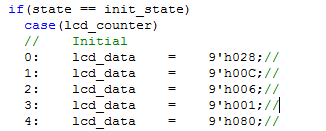
Init_state: 对LCD1602初始化。就是发送初始化的一些命令。
Write_1line_state: 写第一行数据的状态。在这个状态中,写的数据是写在第一行。
Wait_1line_state: 写第一行的等待状态。在第一行中写数据后,就会跳到这个状态,如果超过一定时间,没有接收到使能信号,就说明数据写完了。然后就跳转到wait_data_state。
write_2line_cmd_state: 因为LCD一行只能显示16个字符,如果超过16个字符,就要写到下一行,但是在写到第二行之前,需要发送命令0Xc0.将光标移到第二行。
write_2line_state和wait_2line_state两个状态和写第一行的两个状态功能是一样的。
wait_data_state: 当数据写完之后,会到这个状态。如果接收到新的数据,就说明要进行新的数据显示了。就跳转到clear_state。
clear_state: 在这个状态,首先发送命令0x01,对屏幕进行清屏,因为要进行新的显示了。然后再发送0x80.将光标移到第一行。然后跳转到Write_1line_state,开始进行写数据。
状态机理清楚后,程序写起来就比较简单了。
// 9'h120 @ 9'h140 ` 9'h160
// ! 9'h121 A 9'h141 a 9'h161
// " 9'h122 B 9'h142 b 9'h162
// # 9'h123 C 9'h143 c 9'h163
// $ 9'h124 D 9'h144 d 9'h164
// % 9'h125 E 9'h145 e 9'h165
// & 9'h126 F 9'h146 f 9'h166
// ' 9'h127 G 9'h147 g 9'h167
// ( 9'h128 H 9'h148 h 9'h168
// ) 9'h129 I 9'h149 i 9'h169
// * 9'h12A J 9'h14A j 9'h16A
// + 9'h12B K 9'h14B k 9'h16B
// , 9'h12C L 9'h14C l 9'h16C
// - 9'h12D M 9'h14D m 9'h16D
// . 9'h12E N 9'h14E n 9'h16E
// / 9'h12F O 9'h14F o 9'h16F
// 0 9'h130 P 9'h150 p 9'h170
// 1 9'h131 Q 9'h151 q 9'h171
// 2 9'h132 R 9'h152 r 9'h172
// 3 9'h133 S 9'h153 s 9'h173
// 4 9'h134 T 9'h154 t 9'h174
// 5 9'h135 U 9'h155 u 9'h175
// 6 9'h136 V 9'h156 v 9'h176
// 7 9'h137 W 9'h157 w 9'h177
// 8 9'h138 X 9'h158 x 9'h178
// 9 9'h139 Y 9'h159 y 9'h179
// : 9'h13A Z 9'h15A z 9'h17A
// ; 9'h13B [ 9'h15B { 9'h17B
// < 9'h13C 锟 9'h15C | 9'h17C
// = 9'h13D ] 9'h15D } 9'h17D
// > 9'h13E ^ 9'h15E 鈫 9'h17E
// ? 9'h13F _ 9'h15F 鈫 9'h17F
module LCD ( // Host Side
input iCLK, //鏃堕挓
input iRST_N, //澶嶄綅锛屼綆鐢靛钩鏈夋晥
input istart,
output ofinish,
input [8:0] idata,
output [3:0] mLCD_DATA,
output mLCD_RS,
output mLCD_RW,
output mLCD_en
);
// Internal Wires/Registers
reg mstart;
wire mfinish;
reg [8:0] lcd_data;
//瀹氫箟4涓姸鎬
localparam init_state = 3'd0; //
localparam write_1line_state = 3'd1; //
localparam wait_1line_state = 3'd2; //
localparam write_2line_cmd_state = 3'd3; //
localparam write_2line_state = 3'd4; //
localparam wait_2line_state = 3'd5; //
localparam wait_data_state = 3'd6;
localparam clear_state = 3'd7;
localparam wait_number = 26'b11_1111_1111_1111_1110_1111_1111;
//localparam wait_number = 26'b111_1111_1111;
reg [2:0] state;
reg [4:0] lcd_counter;
reg [25:0] time_counter;
assign ofinish = (state == write_1line_state || state == write_2line_state ) ? mfinish : 1'b0;
always@(posedge iCLK or negedge iRST_N) begin
if(!iRST_N)
begin
state <= init_state;
mstart <= 1'b0;
lcd_counter <= 'd0;
time_counter <= 'd0;
end
else
begin
case(state)
init_state: begin
mstart <= 1'b1;
if(mfinish == 1)
begin
if(lcd_counter >= 'd4)
begin
lcd_counter <= 'd0;
state <= write_1line_state;
mstart <= 1'b0;
end
else
lcd_counter <= lcd_counter + 1'b1;
end
end
write_1line_state: begin
mstart <= istart;
time_counter <= 'd0;
if( mfinish == 1 )
begin
if(lcd_counter > 14 )
begin
lcd_counter <= 'd0;
state <= write_2line_cmd_state;
end
else
begin
lcd_counter <= lcd_counter + 1'b1;
state <= wait_1line_state;
mstart <= 1'b0;
end
end
end
wait_1line_state: begin
if (istart == 1)
begin
time_counter <= 'd0;
state <= write_1line_state;
end
if(time_counter > wait_number)
begin
state <= wait_data_state;
end
else
time_counter <= time_counter + 1'b1;
end
write_2line_cmd_state: begin
mstart <= 1'b1;
if( mfinish ==1 )
begin
mstart <= 1'b0;
state <= write_2line_state;
end
end
write_2line_state: begin
mstart <= istart;
time_counter <= 'd0;
if( mfinish == 1 )
begin
if(lcd_counter > 14 )
begin
lcd_counter <= 'd0;
state <= clear_state;
lcd_counter <= 'd0;
end
else
begin
lcd_counter <= lcd_counter + 1'b1;
state <= wait_2line_state;
mstart <= 1'b0;
end
end
end
wait_2line_state: begin
if (istart == 1)
begin
time_counter <= 'd0;
state <= write_2line_state;
mstart <= 1'b1;
end
if(time_counter > wait_number)
begin
state <= wait_data_state;
end
else
time_counter <= time_counter + 1'b1;
end
wait_data_state: begin
mstart <= 1'b0;
if(istart == 1)
state <= clear_state;
lcd_counter <= 'd0;
end
clear_state: begin
mstart <= 1'b1;
if(mfinish == 1)
begin
if(lcd_counter >= 1)
begin
lcd_counter <= 'd0;
state <= write_1line_state;
end
else
lcd_counter <= lcd_counter + 1'b1;
end
end
endcase
end
end
always @ (*)
begin
if(state == init_state)
case(lcd_counter)
// Initial
0: lcd_data = 9'h028;//
1: lcd_data = 9'h00C;//
2: lcd_data = 9'h006;//
3: lcd_data = 9'h001;//
4: lcd_data = 9'h080;//
5: lcd_data = 9'h16c;
6: lcd_data = 9'h175;
7: lcd_data = 9'h16A;
8: lcd_data = 9'h175;
9: lcd_data = 9'h16E;
10: lcd_data = 9'h121;
default: lcd_data = 9'h001;
endcase
else if(state == clear_state)
case(lcd_counter)
0: lcd_data = 9'h001;
1: lcd_data = 9'h080;
2: lcd_data = 9'h080;
default: lcd_data = 9'h001;
endcase
else if(state == write_2line_cmd_state)
lcd_data = 9'h0c0;
else
lcd_data = idata;
end
LCD_Controller u1( // Host Side
.iDATA (lcd_data[7:0]), //杈撳叆鍙戦€佺殑8浣嶆暟鎹
.iRS (lcd_data[8]), //杈撳叆鍛戒护鏁版嵁閫夋嫨淇″彿
.iCLK (iCLK), //鏃堕挓
.iRST_N (iRST_N), //澶嶄綅淇″彿 锛浣庣數骞虫湁鏁
.iStart (mstart), //LCD鎺у埗鍣ㄦ湁鏁堜俊鍙 1 LCD寮€鍚伐浣 0 LCD鍋滄宸ヤ綔
.oDone(mfinish), //LCD瀹屾垚淇″彿 1琛ㄧず瀹屾垚
// LCD Interface
.LCD_DATA(mLCD_DATA[3:0]), //LCD 4浣嶆暟鎹
.LCD_RW (mLCD_RW), //LCD 璇诲啓淇″彿 0琛ㄧず鍐 1琛ㄧず璇
.LCD_EN (mLCD_en), //LCD 璇诲啓浣胯兘淇″彿 涓嬮檷娌挎湁鏁
.LCD_RS (mLCD_RS) //LCD 鍛戒护鏁版嵁閫夋嫨淇″彿 1閫夋嫨
);
endmodule
然后在写一个顶层,将各个模块进行调用,然后连接信号即可。
最后贴上效果图:
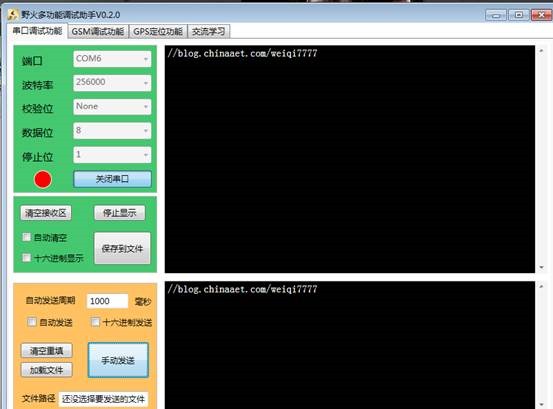
开发板显示:

发送的数据和LCD上显示的数据一样。并且串口接收的数据和发送的数据一样。