BUFGMUX使用
0赞1、在多个时钟选择输出1个时,使用BUFGMUX,官方手册UG382 (38页);
2、参数Clk type: "SYNC" or "ASYNC"
SYNC:两个输入时钟必须都有效,在切换信号变化后,输出保持无效(0 or 1都可能)直到后一个clk的变化沿(上下沿)时输出时钟;The primitive guarantees that when the select line S is toggled to choose the other clock source, the output remains in the inactive state until the next active clock edge on either input.
ASYNC:切换信号变化后,立即输出下一个时钟。
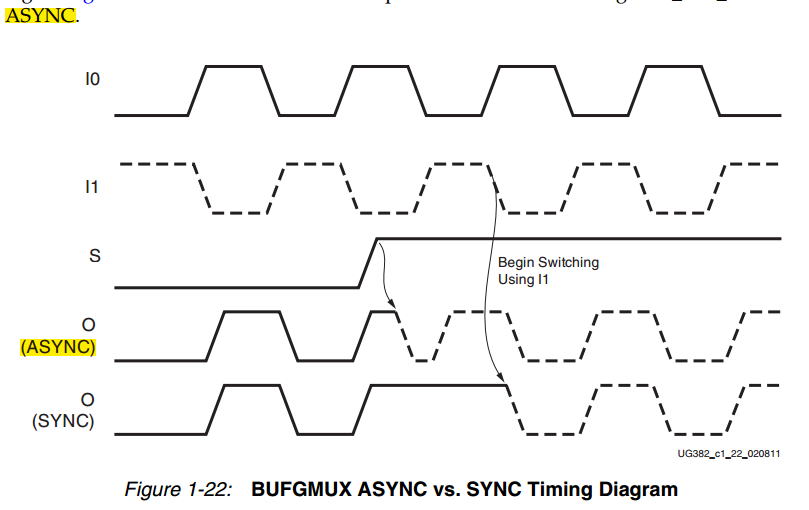
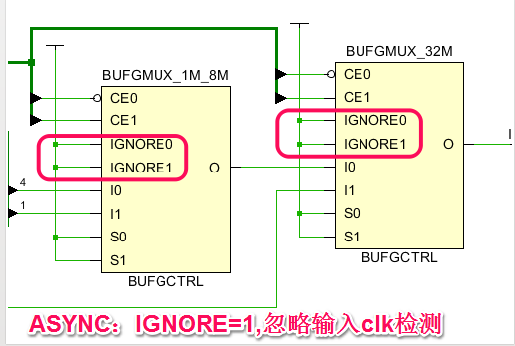 .
.
3、例化代码
BUFGMUX #(
.CLK_SEL_TYPE("ASYNC" )// Clk type: "SYNC" or "ASYNC" (原语模版中没有注明)
)
BUFGMUX_1M_8M (
.O(clk_out_i), // 1-bit output: Clock output
.I0(clk_divider[4]), // 1-bit input: Clock input (S=0)
.I1(clk_divider[1]), // 1-bit input: Clock input (S=1)
.S(s[0]) // 1-bit input: Clock select
);
4、MUX上电后的输出有110ns左右的等待期,之后才正常用S端控制。在此期间控制端口为默认值0,输出端口输出I0默认值。


