STC15软件复位与上电复位
0赞
发表于 3/16/2017 11:02:08 PM
阅读(15854)
在STC15系列单片机中提供了7种复位方式,包括:外部RST引脚复位、软件复位、掉电复位/上电复位、内部低压检测复位、MAX810专用复位电路复位、看门狗复位和程序地址非法复位。
当STC单片机正在运行用户程序时,有时需要对单片机系统进行软件复位。在传统51单片机上并没有提供此功能,用户必须用软件模拟实现,而且存在一些弊端,比如一般不能在中断中实现等。
在STC推出的单片机中提供的软件复位的功能可以通过设置IAP_CONTR寄存器中SWBS位(第6位)和SWRST位(第5位)实现。同时可以通过PCON的POF位来判断是否为上电复位。
具体寄存器可见:
1、IAP_CONTR寄存器

(1)SWBS——在软件复位后,软件选择从用户应用程序区启动还是从系统ISP监控程序区启动。当该位为1时,选择从系统ISP监控程序区启动;当该位为0时,选择从用户应用程序区启动。
(2)SWRST——软件复位控制位。当该位为0时,表示没有复位操作;当该位为1时,软件控制产生复位,单片机自动复位
2、PCON寄存器

(1)POF——上电复位标志位。当单片机断电后,上电复位标志设置为1,该位由软件清除。
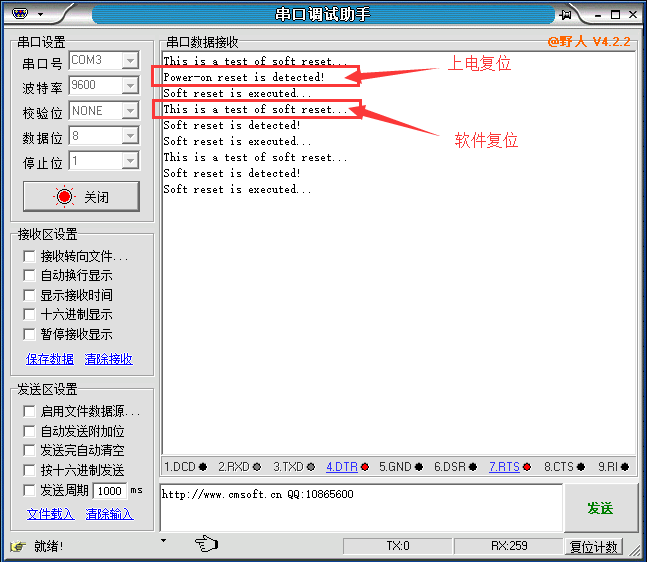
下面测试一下软件复位以及判断一下是否成功,在P55引脚上接了一个LED,可以查看LED灯是否一直闪烁,或通过串口查看复位提示:
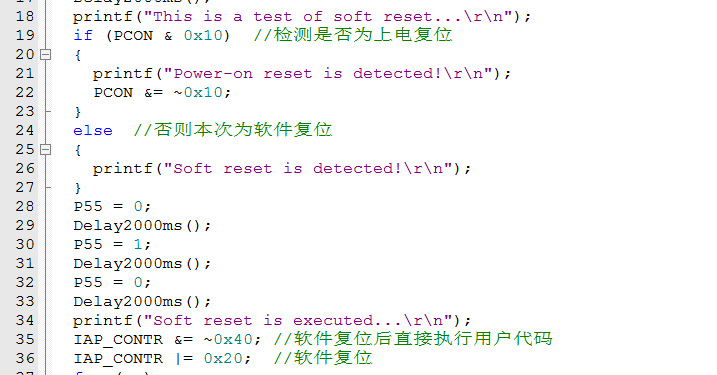
完整程序为:
#include <STC15F2K60S2.H>
#include <stdio.h>
#include <intrins.h>

void Delay2000ms(void);
void UartInit(void);
void GpioInit(void);

void main(void)
{
    GpioInit();
    UartInit();
    Delay2000ms();
    Delay2000ms();
    Delay2000ms();
    Delay2000ms();
    Delay2000ms();
    printf("This is a test of soft reset...\r\n");
    if (PCON & 0x10)  //检测是否为上电复位
    {
        printf("Power-on reset is detected!\r\n");
        PCON &= ~0x10;
    }
    else  //否则本次为软件复位
    {
        printf("Soft reset is detected!\r\n");
    }
    P55 = 0;
    Delay2000ms();
    P55 = 1;
    Delay2000ms();
    P55 = 0;
    Delay2000ms();
    printf("Soft reset is executed...\r\n");
    IAP_CONTR &= ~0x40; //软件复位后直接执行用户代码
    IAP_CONTR |= 0x20;  //软件复位
    for (;;)
    {
        ;
    }
}

void UartInit(void)        //9600bps@11.0592MHz
{
    SCON = 0x50;        //8位数据,可变波特率
    AUXR |= 0x01;        //串口1选择定时器2为波特率发生器
    AUXR |= 0x04;        //定时器2时钟为Fosc,即1T
    T2L = 0xE0;        //设定定时初值
    T2H = 0xFE;        //设定定时初值
    AUXR |= 0x10;        //启动定时器2
}

char putchar(char c)
{
    SBUF = c;
    while(TI == 0);
    TI = 0;
    return c;
}

void GpioInit(void)
{
    P0M0 = 0x00;
    P0M1 = 0x00;

    P1M0 = 0x00;
    P1M1 = 0x00;

    P2M0 = 0x00;
    P2M1 = 0x00;

    P3M0 = 0x00;
    P3M1 = 0x00;

    P4M0 = 0x00;
    P4M1 = 0x00;

    P5M0 = 0x00;
    P5M1 = 0x00;

}

void Delay2000ms(void)        //@11.0592MHz
{
    unsigned char i, j, k;

    _nop_();
    _nop_();
    i = 85;
    j = 12;
    k = 155;
    do
    {
        do
        {
            while (--k);
        } while (--j);
    } while (--i);
}
演示效果,可见串口输出了正确的信息,而且单片机不断软件复位!