为Word中c代码添加行号
0赞
发表于 2020/3/5 下午3:39:51
阅读(1927)
平常经常会在自己的教学文档和技术笔记中插入c源代码,而word文档中的c代码格式并没有像一些代码编辑软件(notepad等)中那么美观,通过百度查找各种资料,发现有很多文章对word中代码排版的问题提出了解决方案。本文在原有基础上做了调整和修改,利用word复制粘贴富文本的功能实现代码高亮和VB宏来加行号和排版。
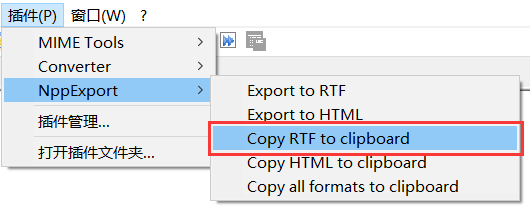
1、使用notepad打开c源代码,选中代码后,使用菜单中插件Copy RTF to clipboard工具将代码进行复制。

2、在word中插入一个2列1行的表格,将notepad中复制的代码粘贴到表格的第2列。
3、创建宏。格式化表格并设置代码行号的宏代码如下
Sub 设置代码行号() ' ' 背景色为morning的配色方案,RGB为(229,229,229) Dim codeLineNumber As Integer With Selection.Tables(1) With .Shading .Texture = wdTextureNone .ForegroundPatternColor = wdColorAutomatic End With .Borders(wdBorderLeft).LineStyle = wdLineStyleNone .Borders(wdBorderRight).LineStyle = wdLineStyleNone .Borders(wdBorderTop).LineStyle = wdLineStyleNone .Borders(wdBorderBottom).LineStyle = wdLineStyleNone .Borders(wdBorderDiagonalDown).LineStyle = wdLineStyleNone .Borders(wdBorderDiagonalUp).LineStyle = wdLineStyleNone .Borders.Shadow = False .Range.HighlightColorIndex = wdNoHighlight .Columns(1).Shading.BackgroundPatternColor = wdColorGray20 .Columns(1).Width = 25 .Columns(2).Shading.BackgroundPatternColor = wdColorGray05 .Columns(2).Width = 400 End With With Options .DefaultBorderLineStyle = wdLineStyleSingle .DefaultBorderLineWidth = wdLineWidth050pt .DefaultBorderColor = wdColorAutomatic End With ' 段落无首行缩进,行间距为固定值12磅 With Selection.ParagraphFormat .LeftIndent = CentimetersToPoints(0) .RightIndent = CentimetersToPoints(0) .SpaceBefore = 0 .SpaceBeforeAuto = False .SpaceAfter = 0 .SpaceAfterAuto = False .LineSpacingRule = wdLineSpaceExactly .LineSpacing = 14 .KeepWithNext = False .KeepTogether = False .PageBreakBefore = False .NoLineNumber = False .Hyphenation = True .FirstLineIndent = CentimetersToPoints(0) .OutlineLevel = wdOutlineLevelBodyText .CharacterUnitLeftIndent = 0 .CharacterUnitRightIndent = 0 .CharacterUnitFirstLineIndent = 0 .LineUnitBefore = 0 .LineUnitAfter = 0 .MirrorIndents = False .TextboxTightWrap = wdTightNone .AutoAdjustRightIndent = True .DisableLineHeightGrid = False .FarEastLineBreakControl = True .WordWrap = True .HangingPunctuation = True .HalfWidthPunctuationOnTopOfLine = False .AddSpaceBetweenFarEastAndAlpha = True .AddSpaceBetweenFarEastAndDigit = True .BaseLineAlignment = wdBaselineAlignAuto End With ' 清除原有的段落底纹 Selection.ParagraphFormat.Shading.BackgroundPatternColor = wdColorAutomatic codeLineNumber = Selection.Paragraphs.Count With Selection.Tables(1).Columns(1) For i = 1 To codeLineNumber - 1 Selection.TypeText Text:=i Selection.TypeParagraph Next Selection.TypeText Text:=行数 End With End Sub |
4、选择整个表格后,运行设置代码行号宏,完成格式化表格和加行号
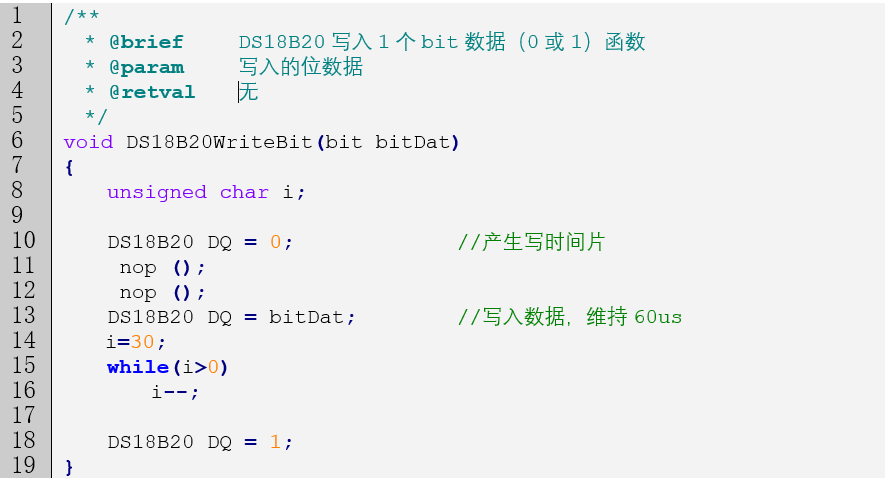
运行效果如下图所示: