[技术分享]cy7c68001的usb驱动程序开发
0赞开发usb驱动程序设计分为三个部分:
1.固件设计
2.驱动开发
3.应用程序设计
固件设计:采用Crypress的cy7c68001作为usb通用接口,将cy7c68001配置在tms320f28335的i/o空间0x280000,采用cy7c68001的并行异步读写方式完成二者之间数据和命令的交换.cy7c68001除了存储器接口外,还有1个中断信号usbint和4个状态信号(ready,flaga,flagb和flagc),中断信号usbint连接tms320f28335的外部中断int1,状态信号ready,flaga,flagb和flagc分别和GPIO13,GPIO14,GPIO15连接,可通过读tms320f28335的IO口读状态。
2.驱动开发
USB设备驱动程序是一种典型的WDM(Windows Driver Model)驱动程序,其程序模型如图1所示。用户应用程序工作在Windows操作系统的用户模式层,它不能直接访问USB设备,当需要访问时,通过调用操作系统的API(Application PROGRAMMING INTERFACE)函数生成I/O请求信息包(IRP),IRP被传输到工作于内核模式层的设备驱动程序,并通过驱动程序完成与UBS外设通信。设备驱动程序包括两层:函数驱动程序层和总线驱动程序层,函数驱动程序一方面通过IRP及API函数与应用程序通信,另一方面调用相应的总线驱动程序,总线驱动程序完成和外设硬件通信。USB总线驱动程序已经由操作系统提供,驱动程序开发的重点是函数驱动程序。
USB设备驱动程序的设计
该驱动程序的主要功能包括:从控制端点0读取规定个数的数据、向端点0发出控制命令、从端点2批量读数据、向端点2批量写数据,驱动程序的开发采用DriverStudio3.2驱动程序开发包及VC++6.0,使用开发包中的向导程序DriverWizard就可以方便的生成驱动程序框架、模块及部分程序源代码,开发者只需要在功能模块中加入自己的实现程序就能完成复杂的USB设备驱动程序设计,下面介绍使用DriverWizard生成cy7c68001驱动程序的过程:
(1)启动DriverWizard,选择DriverWorks Project创造一个名为test的VC++项目;
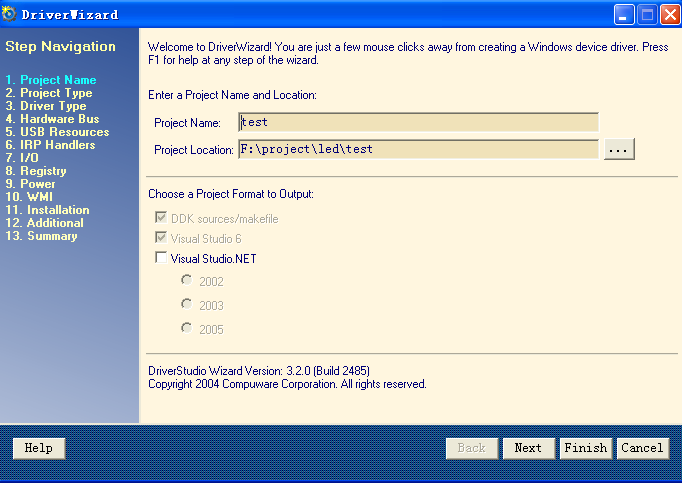
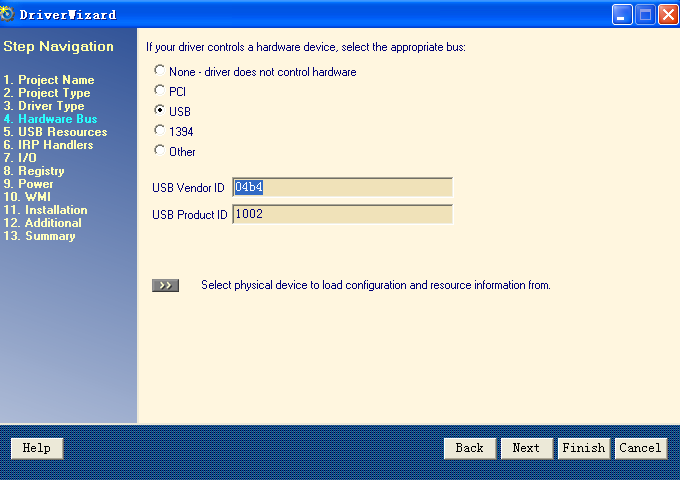
(2)在驱动程序类型中选择WDM Driver,WDM Function Driver,在硬件设备所支持的总线类型中选择USB(WDM Only),在USB Vendor ID(厂商识别码)中填写04b4,在USB Product ID(产品识别码)中填写1002;
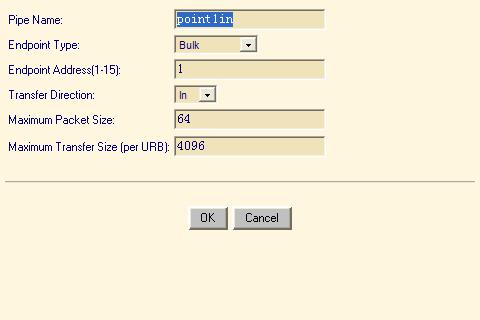
(3)增加USB设备端点,设置端点2,4为批量输入,6,8为批量输出传输方式;
4)选择I/O口的读写方式
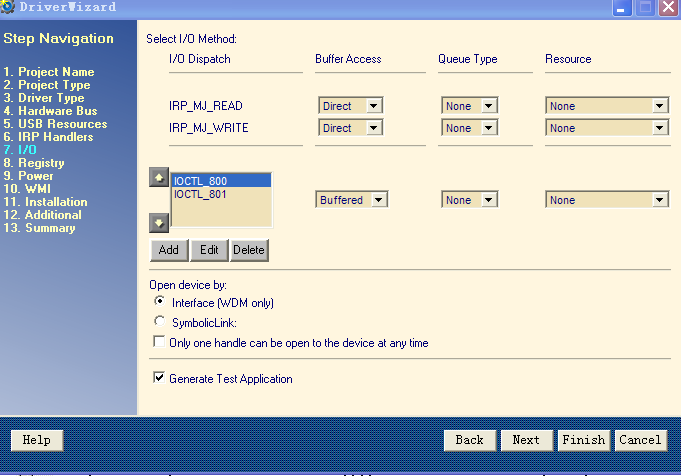
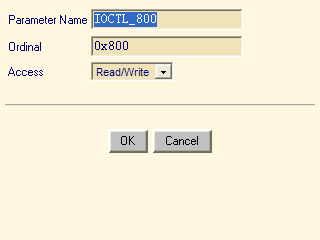
下面的直接选择“NEXT”就可以了,
生成了两个文件,一个是驱动程序,一个是应用程序。
修改驱动程序testDerive.cpp下的NTSTATUS testDevice::Read(KIrp I)和NTSTATUS testDevice::Write(KIrp I)函数如下:
NTSTATUS testDevice::Read(KIrp I)
{
T.Trace(TraceInfo, __FUNCTION__"++. IRP %p\n", I);
NTSTATUS status = STATUS_SUCCESS;
// TODO: Validate the parameters of the IRP. Replace "FALSE"
// in the following line with error checking code that
// evaulates to TRUE if the request is not valid.
if (FALSE)
{
status = STATUS_INVALID_PARAMETER;
I.Information() = 0;
I.PnpComplete(status);
T.Trace(TraceWarning, __FUNCTION__"--. IRP %p, STATUS %x\n", I, status);
return status;
}
// Always ok to read 0 elements
if (I.ReadSize() == 0)
{
I.Information() = 0;
I.PnpComplete(this, status);
T.Trace(TraceInfo, __FUNCTION__"--. IRP %p, STATUS %x\n", I, status);
return status;
}
KMemory Mem(I.Mdl()); // Declare a memory object
// Get a pointer to the caller's buffer. Note that this
// routine is safe on all platforms.
ULONG readSize = I.ReadSize();
ULONG dwMaxSize =point1in.MaximumTransferSize() ;
if(readSize>dwMaxSize)
{
ASSERT(dwMaxSize);
readSize=dwMaxSize;
}
ULONG dwBytesRead = 0;
PURB pUrb = point1in.BuildBulkTransfer(
Mem, // Where is data coming from?
readSize, // How much data to read?
TRUE, // direction (TRUE = IN)
NULL, // Link to next URB
TRUE
);
if ( pUrb != NULL)
{
// Submit the URB to our USB device, synchronously - say less is OK
pUrb->UrbBulkOrInterruptTransfer.TransferFlags =
(USBD_TRANSFER_DIRECTION_IN | USBD_SHORT_TRANSFER_OK);
status = point1in.SubmitUrb(pUrb, NULL, NULL);
if ( NT_SUCCESS(status) )
{
dwBytesRead = pUrb->UrbBulkOrInterruptTransfer.TransferBufferLength;
}
delete pUrb;
}
// TODO: At this point, perform any processing for IRP_MJ_READ
// To satisfy the read now, transfer data from the driver
// to the caller's buffer at "pBuffer". Then, indicate
// how much data was transferred:
I.Information() = dwBytesRead;
I.PnpComplete(this, status);
T.Trace(TraceInfo, __FUNCTION__"--. IRP %p, STATUS %x\n", I, status);
return status;
}
///////////////////////////////////////////////////////////////////////////////////////////////////
// testDevice::Write
// Dispatch routine for IRP_MJ_WRITE requests.
//
// Arguments:
// IN I
// the write IRP
//
// Return Value:
// NTSTATUS
//
NTSTATUS testDevice::Write(KIrp I)
{
T.Trace(TraceInfo, __FUNCTION__"++. IRP %p\n", I);
NTSTATUS status = STATUS_SUCCESS;
KMemory Mem(I.Mdl()); // Declare a memory object
// Get a pointer to the caller's buffer. Note that this
// routine is safe on all platforms.
PUCHAR pBuffer = (PUCHAR) Mem.MapToSystemSpace();
ULONG writeSize = I.WriteSize();
ULONG bytesSent = 0;
// TODO: Validate the parameters of the IRP. Replace "FALSE"
// in the following line with error checking code that
// evaulates to TRUE if the request is not valid.
if (pBuffer==NULL)
{
status = STATUS_INVALID_PARAMETER;
I.Information() = 0;
I.PnpComplete(status);
T.Trace(TraceWarning, __FUNCTION__"--. IRP %p, STATUS %x\n", I, status);
return status;
}
// Always ok to write 0 elements
if (I.WriteSize() == 0)
{
I.Information() = 0;
I.PnpComplete(this, status);
T.Trace(TraceInfo, __FUNCTION__"--. IRP %p, STATUS %x\n", I, status);
return status;
}
ULONG dwBytesSent = 0;
PURB pUrb = pointout.BuildBulkTransfer(
pBuffer, // Where is data coming from?
writeSize, // How much data to write?
FALSE, // direction (FALSE = OUT)
NULL // Link to next URB
);
// Submit the URB to our USB device, synchronously
if (pUrb != NULL)
{
status = pointout.SubmitUrb(pUrb, NULL, NULL);
if ( NT_SUCCESS(status) )
{
dwBytesSent = pUrb->UrbBulkOrInterruptTransfer.TransferBufferLength;
// Tracer << "Write() posted " << dwTotalSize << " bytes to USB\n";
}
delete pUrb;
}
// TODO: At this point, perform any processing for IRP_MJ_WRITE
// To satisfy the write now, transfer data to the driver
// from the caller's buffer at "pBuffer". Then, indicate
// how much data was transferred:
I.Information() = dwBytesSent;
I.PnpComplete(this, status);
T.Trace(TraceInfo, __FUNCTION__"--. IRP %p, STATUS %x\n", I, status);
return status;
}
编译即可进行批量传输操作了。
应用程序;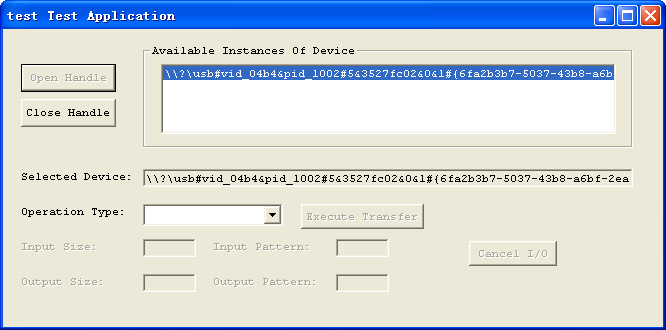
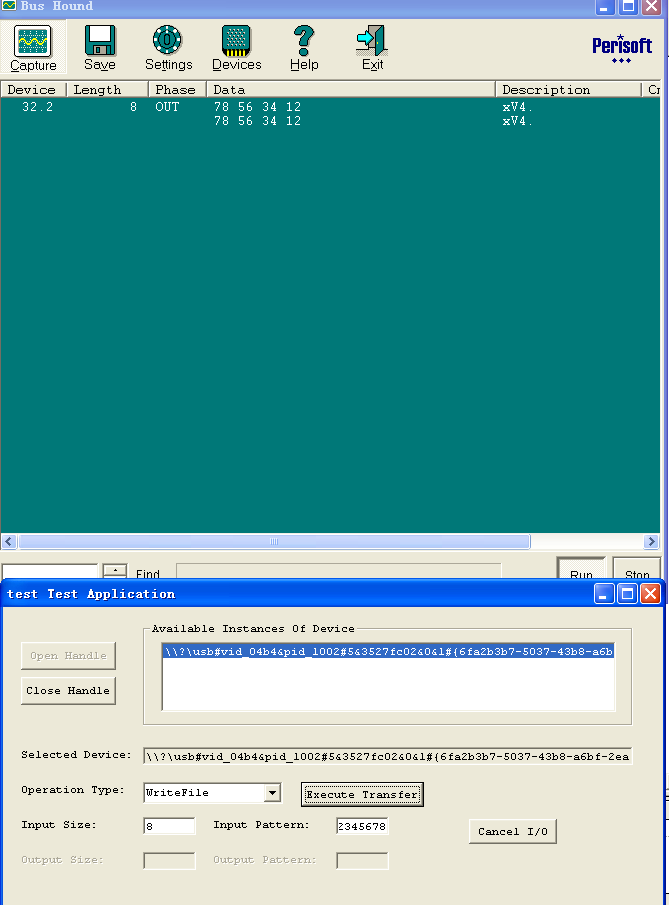
选择设备,点击“open Handle”按键并选择“writefile”,输入要写的字符串“12345678”,通过BusHands可以检测到向下发送的数据